© 2021-2026 Xenon Connect Limited. All rights reserved - Terms - Privacy - Data Security

Xenon Connect is a toolkit designed to streamline bookkeeping and accounting processes for professionals.
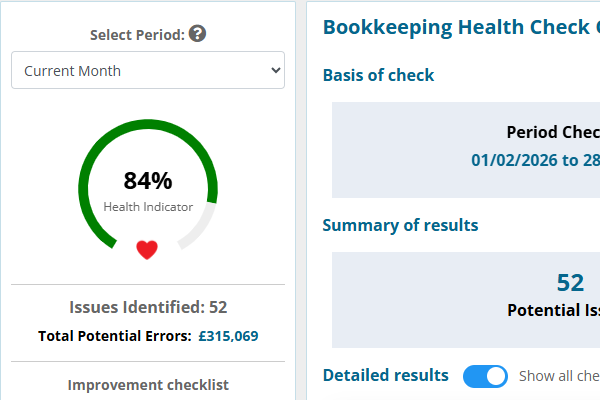
Automatically detect bookkeeping errors, faster, with Xenon Exact. A detailed checklist of specific bookkeeping transactions that require review – rolled into an overall bookkeeping healthcheck report.
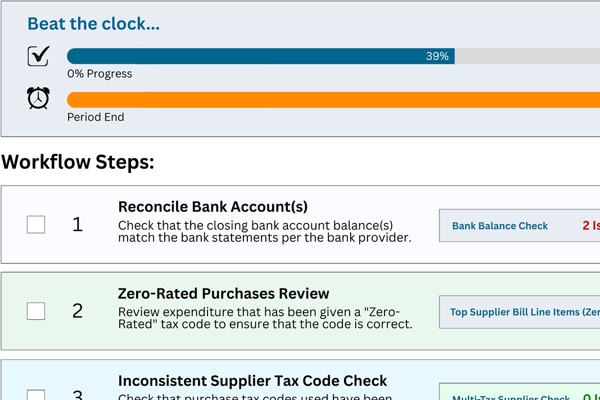
A workflow module for core bookkeeping and accounting tasks, that have bookkeeping data review popups and Xenon Exact’s data quality checks deeply embedded. Create consistent, repeatable processes for your team.

Access quick insight into the main KPIs that clients (and advisors) care about, including sales tracker, cash health, tax estimate, dividend availability & business valuation widgets. View transaction count metrics and bookkeeping complexity reports.
Automatic notifications when a client hits a sales target, breaches the VAT registration threshold, has a financial year end approaching etc. Get notified when a team member tags you in a note created throughout the portal.
Review 75+ metrics for all of your clients in one dashboard, with a focus on transaction counts, bookkeeping data quality, financial performance & position.
Analyse. Detect. Cleanse. Review.
A connection is created between Xenon Connect and Xero, QuickBooks Online, Sage or FreeAgent which pulls in your bookkeeping data automatically every night, ensuring that Xenon Connect stays up to date with all transactional data.
Manual interim sync processes can be actioned at the click of a button.
The Xenon Exact area automatically analyses every transaction in the background.
Any potential errors and issues found within your bookkeeping data are brought to your attention in the form of a Bookkeeping Health Checklist – allowing you to pinpoint where your time is best spent.
Xenon Insights is a suite of 9 financial KPIs which highlight the current performance and position of the business.
An alert notification is created when various conditions surrounding the business financials require your attention.
Better quality bookkeeping data. Faster.
Xenon Connect’s Bookkeeping Data Checks analyse your business’s Xero, QuickBooks Online, FreeAgent & Sage data, automatically detect bookkeeping issues and help you to quickly fix them.
The result is accurate financial data that you can rely on as a basis for making better business decisions and for reducing the risk of a tax authority compliance review.
Identify the number of bank transactions that require explaining, reconciling or both.
Identify customer invoices that have a high probability of having been duplicated in error.
Identify supplier bills that have a high probability of having been duplicated in error.
Identify older invoices that should have already been paid by the customer.
Identify older bills that should have already been paid to the supplier by the business.
Identify customers and suppliers that have a high probability of being added to the system more than once, in error.
Identify customers and suppliers that have at least one default account or tax code missing .
Identify transactions that have been coded to an account that is not the default account for the particular contact.
Identify contacts that have not been used for a long time, or at all.
Identify bank payments that have been processed directly to an account code when an unpaid bill exists for the same supplier.
Identify bank deposits that have been processed directly to an account code when an unpaid invoice exists for the same customer.
Identify transactions that have been given a tax code that is not the default tax code for the particular contact.
Identify customer invoices that have been created, but are marked with a status of “Draft” or “Submitted”.
Identify supplier bills that have been created, but are marked with a status of “Draft” or “Submitted”.
Identify transactions that have been coded to a particular expense account even though the transaction’s value is high.
Identify transactions that have been coded to an account of type “Fixed Asset” even though the transaction’s value is low.
Identify supplier contacts which have transactions that have been coded to more than one account code.
Identify supplier contacts which have transactions that have been coded to more than one tax code.
Identify customer sales credit notes that are old and not yet attached to an invoice or refunded.
Identify supplier purchase credit notes that are old and not yet attached to a bill or refunded.
Identify transactions that have been coded to a broad/vague account code and are greater than a specific value.
Identify differences between the balance sheet in the bookkeeping software and statutory accounts filed with Companies House.
Identify sales invoices and direct deposits that have been posted to a sales account without a VAT/sales tax code applied.
Identify supplier bills and direct payments that have been posted to an expense account without a VAT/purchase tax code applied.
Check that the bank balance in the bookkeeping software matches the bank balance per the statement, optionally uploading evidence.
Identify payments and deposits on the bank feed that have not yet been processed and are therefore not reflected in the ledgers.
Identify supplier bill line items that have been posted with a sales tax / output tax code in error.
Identify customer invoice line items that have been posted with a purchase tax / input tax code in error.
Check that all supplier bills have supporting documentation attached in the bookkeeping package. Quickly upload missing attachments.
Where compliance workflows meet real bookkeeping data
Xenon Systemise provides workflow templates that can be tailored to the way that you and your team do things.
The result is consistent, concise, repeatable processes that you can rely on to guide your team through their day to day workflows.
Detailed workflow templates are provided (which can be customised) that cover the steps required to process common tasks (e.g. bookkeeping, VAT reviews, management accounts etc).
Create recurring workflow schedules that are automatically created at the start of each workflow period, based upon templates. Quickly tailor the workflow steps to the specific process for each client.
Each workflow step can be deeply linked to any of the Xenon Exact bookkeeping data checks. View the number of issues directly within the workflow (e.g. Old Unpaid Invoices, for a bad debt review workflow step).
Quickly review bookkeeping transactions that relate to the workflow step currently being prepared (e.g. checking the top supplier bill line items with a “No Tax” tax code).
Assign a main preparer and reviewer to each task / schedule of tasks to ensure team member accountability.
Assign team members to specific workflow steps, regardless of who is assigned as overall task preparer.
The “What you need to know” area summarises the key points and risk areas for the prepared task, before you get deep into the review process.
Create ‘Sticky Notes’ for any permanent information that you want to highlight for future tasks for the same schedule, client or template.
A target completion date is created for each workflow – the date by which the team aim to complete the task. This is in addition to the final deadline date.
Create notes at a workflow step level or individual bookkeeping transaction level. Tag other users to bring the note to their attention.
Quickly upload supporting files as evidence in respect of a specific workflow step, or within a sticky note on the task as a whole.
Each workflow has a “beat the clock” status indicator which compares progress against time remaining until the task deadline date – providing level of urgency.
Mark steps as prepared/reviewed, reassign preparer and delete workflow steps in bulk (depending on user role).
Team members can quickly enable a toggle so that each workflow only shows steps to which they are allocated, ensuring focus.
The preparer of the workflow is prompted to quickly notify the reviewer that their review can start. A notification and email is sent.
The assigned reviewer of the workflow can quickly tell the preparer that amendments are required. A notification and email is sent.
Monitor growth. Assess financial position. Avoid nasty surprises.
Xenon Connect’s Insights allow you to monitor the 9 key performance and position indicators which form the lifeblood of the business.
The result is relevant figures throughout the year which reduce the risk of nasty surprises and provide the foundations for future growth planning.
Review actual monthly sales income against existing budgets, automatic targets or manual targets.
Compare current cash and bank balances with short, medium and long-term expected outgoings.
Review a summary of the current Bookkeeping Health Check results.
A graphical monthly comparison of Sales Income, Gross Profit and Net Profit figures.
An up to date estimate of the corporation tax liability in the current and previous 2 years.
Review of the current position of each director’s loan account, to avoid overdrawn loan accounts.
An estimate of business valuation, based upon the chosen sales, profit or net asset based model.
A monthly comparison of the ability of the business to manage it’s cash flow position.
A review of the level of cumulative profit reserves available to be extracted as dividend.
Automatic. Timely. Portal & Email based.
Get alerted within Xenon Connect and via regular update emails when something significant occurs or needs to occur.
Xenon Connect will keep an eye on your actual sales figure for the current month. Receive a notification when your actual sales figure exceeds your target sales figure.
Xenon Connect detects if you are not yet VAT registered and informs you when the business’ taxable sales figure breaches (or is approaching) the current VAT registration threshold (UK).
Xenon Connect detects when your accounting year end is. Get notified when your year end is approaching so that you can make preparations to get your year end figures in order.
If you have fee packages based upon transaction counts and/or turnover, Xenon Connect will notify you when the client’s actual activity creeps above the limit of their current package.
Xenon Connect allows the preparer of a Xenon Systemise workflow to notify the reviewer that it is ready for review. The reviewer can also notify the preparer that amendments are required.
Xenon Connect creates a notification when a team member tags you in a note attached to a bookkeeping transaction, data check or workflow step.
‘A very useful, powerful add-on to identify matters requiring different levels of attention in Xero accounting files.
The client overall panorama is good as you can compare how different clients manage their accounts and can then drill down in specific areas.’
© 2021-2026 Xenon Connect Limited. All rights reserved - Terms - Privacy - Data Security